Live event engraving
Live event engraving is a laser engraving booth at your event: guests pick an item and watch their name engraved in about 90 seconds.
Live time is $275 per hour with a 2-hour minimum (3 hours for 50 to 100 guests). Plan on roughly 15 to 25 guests an hour. A 50% deposit locks your date, and events outside Collin County add a $150 travel fee.
We set up a booth at your event and turn ordinary party favors into forever keepsakes. Bring your own items or let us source them. We bring the laser, the artwork setup and the crowd energy.
Our recommendation for live events: even though the limit is 5 in × 5 in, we highly recommend keeping live engraved designs to names, dates and initials. It keeps the flow of your event efficient and avoids a bottleneck from delays at the booth. We aim to keep each engraving to about a minute and a half at most.
Event packages
| Package | Hours | Guests | Included | From |
|---|---|---|---|---|
| Essentials | 2 | about 30 | All engraving live at the event | $550 |
| Signature | 3 | about 50 | Pre-engraved logo and live names | $1,075 |
| Premier | 4 | up to 100 | Pre-engraved logo and design help | $1,600 |
| Grand | 5 | 100 to 150 | Pre-engraved logo and live names | $2,000 |
From prices are before sales tax and any travel fee. Live time is $275 per hour, and pre-engraved items are $5 each.
Where we serve in DFW. We bring the laser to events in Dallas, Fort Worth, Plano, Frisco, McKinney, Allen, Prosper, Princeton, Arlington, Irving, Denton, Richardson, Garland, Little Elm, Celina and Wylie, and across the Dallas-Fort Worth metroplex. We also travel nationwide.
What event hosts can expect from us
- SpaceAbout a 10 ft × 10 ft area. Near an outlet is ideal so we can run an extension cable.
- PowerWe also bring enough power to run the machine and our accessories, so an outlet is a bonus, not a requirement.
- One laserMost events run with one laser. Want a faster line? Add a second laser for an extra cost and we quote it with your event.
- Two attendantsOne laser artist runs the machine. A second attendant helps guests with orders, keeps the queue moving and captures content for our socials.
How to book your event
- Set your guests, hours and location below. Your price updates as you go.
- Tap the date field and pick your date and start time. We set the end time from your guest count.
- Tell us what we are engraving, add your details and send. We email your quote. After you say yes, we send a short agreement to sign on your phone and an invoice you can pay online.
* Required. Everything else is optional. Nothing is booked until we confirm.
Bring My Own Item
See it before you book. Add a photo of your item, drop in your text or logo, and watch the engraving appear on it. Nothing is sent until you tap send.
Bring us something you own and we engrave it. Photograph it, mark the spot, and our laser artist sends you a quote. Prices start at $30 plus tax, and you approve a digital proof before anything is engraved. Free pickup and delivery within Collin County, or $25 for pickup and delivery outside Collin County. The engraving can be up to 5 in × 5 in.
How it works
- Add a photo of your item.
- Type what to engrave or add your own logo, then drag it, resize it and turn it until it looks right.
- Add your details and send. Our artist replies with your price.
* Required. Everything else is optional. Nothing is made until you approve.
- 1Upload your design
- 2We send a proof
- 3You approve, then we engrave
Start here: add a photo of your item.
Add a photo of your item to see the engraving preview below
Tap your engraving to change it. Drag it to move it. Use the A− and A+ buttons to make it smaller or bigger, and the Turn slider to rotate it. The sample item is a placeholder until you add your photo. Choose Glass as the material to preview a frosted white engraving on clear glass.
Image: . It shows in black and white, the way a laser engraves it.
Exact size, turn and wrap
Metal business cards
Every card is precision-cut anodized aluminum: featherweight, scratch-resistant and finished in a rich, deep color. Our laser engraves straight through the anodized layer to reveal bright, bare metal, so your name, logo and QR code are permanent, razor-sharp and will never rub off. Choose from 13 colors and two thicknesses, 0.4 mm or 0.8 mm.
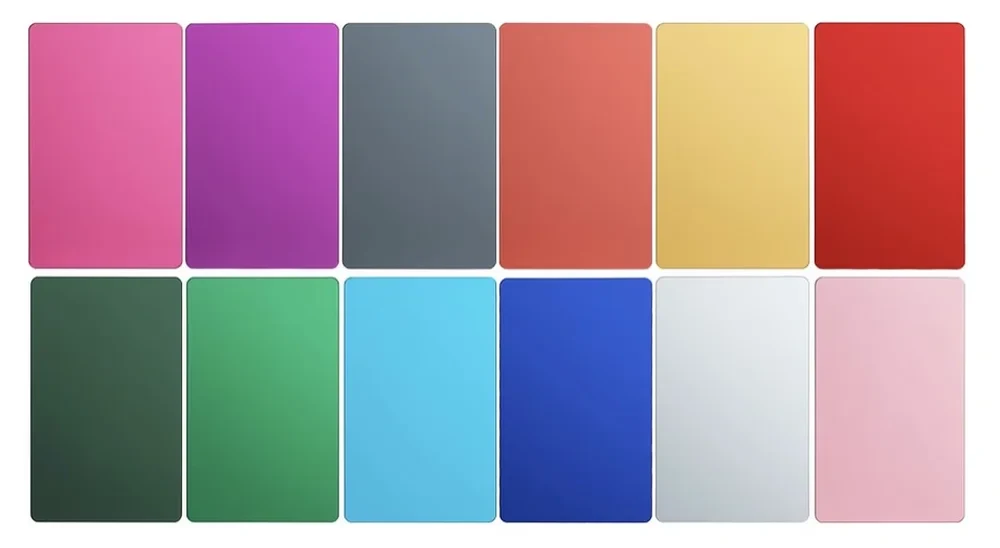
Cards shown are our 0.8 mm thick cards.
How do you want to start?
Upload a photo or scan of your current card. Our laser artist reviews your design first and contacts you to discuss whether it can be converted for metal. If it can, we email you a digital rendering to approve before anything is engraved. The $50 one-time design fee applies only if our artist accepts the conversion. If we can’t convert your design, there is no fee. It is shown in your estimate in case we accept. PNG, JPG or PDF, 5 MB each.
See it before you book. Watch your design appear on the card as you build it. Nothing is sent until you tap send.
Design both sides, pick your metal, and submit. Drag text, logos and QR codes anywhere on the card. The preview shows how the engraving reads on the color you choose.
How it works
- Tap Front or Back, then tap any text on the card to change it, or add text, a logo or a QR code.
- Drag to move. Use the buttons under the card to resize, turn, align or delete.
- Pick your metal and add your details. We reply with a proof and a price.
* Required. Nothing is made until you approve.
Have a PNG or JPG logo? Turn it into an SVG
Pick your logo and we trace it into a clean vector (SVG) the laser can engrave sharply. Black is what gets engraved. Then add it to your card or download it.
Tap anything on the card to change it, or add something with the buttons above. Drag to move it.
Exact size, turn and wrap
Have logos or photos to add? optional
Pictures appear on the card you are editing so you can move and resize them. PDF, AI and EPS cannot be previewed, so describe where they go below. Up to 5 files, 5 MB each. Price may vary with the complexity of the design.
Photo engraving
See it before you book. Upload your photo and watch it appear on the keychain card, pet tag or stemless wine glass. Nothing is sent until you tap send.
Upload a photo and we remove the background and engrave just the subject on an anodized aluminum keychain card or pet tag, or frost it into a stemless wine glass. Pick a piece and the preview shows how it can look. From $35 to $45 per piece, depending on how much setup your photo needs.
Design size limit: our laser engraves a design up to 5 in × 5 in at a time. Anything larger has to be scaled down to fit.
How to order a photo engraving
- Upload your photo. The bigger the file, the sharper the engraving.
- Pick a keychain card, pet tag or wine glass, then a color for metal.
- Add your details and send. We remove the background and reply with a proof.
* Required. Everything else is optional. Nothing is made until you approve.
Preview is an approximation and shows your photo unedited. We remove the background by hand, engrave only the subject, and send a proof before we engrave anything.
Custom and bulk orders
Corporate gifts, team merch, one-of-a-kind products or a big run of the same piece. Tell us what you have in mind and we quote it. Small quantities are welcome: message the laser artist and we will always find a way to make it work.
Design size limit: our laser engraves a design up to 5 in × 5 in at a time. Anything larger has to be scaled down to fit.
How to request a bulk quote
- Tell us what you want engraved and how many.
- Add your logo or artwork if you have it.
- Add your details and send. We reply with your quote.
* Required. Everything else is optional. Nothing is made until you approve.
My Requests
Sign in to track your quotes and inquiries and see where each one stands. Have a reference code? Check it below, on any device.
Create your profile
Preview sign-in: your profile and orders live on this device. Secure email sign-in arrives with the live site.
With a profile
- See your requests and their status in one place
- Book faster with your details already filled in
- One place for events, items, photos and business cards
- Help that knows which requests are yours
Your profile and requests are saved in this browser on this device only. They do not sync to other devices, so keep the reference code from each request.
My Requests
Event Order Queue
At an event? Pick your event and enter the 4-digit code you were given. Then find your name below. Amber means we are still working on it. Green means it is ready, come pick it up.
Heads up: it can take a few minutes for your name to show up after you order. If you do not see it yet, check back in a few minutes. If this page does not load properly, .
Event Order Queue
Event: .
Order pickup
Do not see your name? Ask to be added
Owner Dashboard
Private tools for the owner. Nothing here is shown to customers.
Event codes
Every event you work gets a 4-digit code. Guests pick their event on the Event Order Pickup page and type this code to see the pickup board. Give the code out at the event.
Add an event here first. Saving an event that is already listed changes its code.
Pickup board
This is the list guests watch on the Event Order Pickup page: In progress while you engrave their piece, Ready when it is done. If you run the Event Kiosk, orders land here by themselves. Use the steps below for walk-ups and anyone who did not use the kiosk.
Use a first name and last initial so two Marias do not get mixed up.
Guests asking to be added
These guests asked from their phone. Tap Add to board to put them on the list as In progress.
Event Kiosk (iPad guest mode)
A kiosk is a guest-mode setup for one event: what guests can engrave, which fonts they get, and your exit PIN. Make one, then tap Launch guest mode on the iPad. Only you can start it, and only guests cannot leave without your PIN. For a true lock, also turn on iPad Guided Access (Settings > Accessibility > Guided Access).
The sample is called “TEST Kiosk Demo” with 3 test items, 5 fonts and exit PIN 1234. Delete it when you are done testing.
Order Queue
Orders from the guest kiosk show up here by themselves, with a chime. Each guest is added to the pickup board as In progress the moment they submit. Move each order along as you go, and Ready turns their spot green on the board.
Inventory left
Guest photos
Photos guests send after they pick up, showing their finished piece. Tap one to open it and save it. A green tag means the guest said it is okay to share it on social.
Event summary and export
Download the spreadsheet before you clear an event. Clearing deletes the names, phone numbers and designs for that event (the kiosk setup stays).
The review email goes only to guests who ticked the email sign-up box at the kiosk, and each guest gets it once. Guests who only gave contact details for order alerts are never emailed this.
Email marketing list
Guests who ticked “sign me up” at the kiosk. Only people who said yes are here.
Laser Library
Your private library of laser settings, sorted by material and machine. Only you can see it, from this signed-in dashboard. The leather entries are xTool F2 leatherette settings from l3daccessories.com. Everything else is yours to fill in. Always test on a scrap piece first, then save what worked.
Never laser these
- PVC, vinyl, PVC-based faux leather: releases chlorine gas; harms lungs and corrodes the machine
- Neoprene and chlorinated rubber: chlorine-based; same hazard as PVC
- PTFE (Teflon) and fluoropolymers: toxic fluorine compounds in the fumes
- ABS: toxic fumes, including hydrogen cyanide
- Polycarbonate (Lexan): burns and discolors instead of marking; fumes
- Polystyrene and foams: catches fire easily
- Fiberglass, carbon fiber: hazardous resin fumes and dust
- Unknown or unlabeled plastics: cannot confirm it is safe
If a material cannot be identified, it does not go under the laser. Mirror-finish metal can reflect the beam and damage the laser.
Which laser for which material
- Infrared: stainless steel, anodized aluminum, bare aluminum, brass, copper, titanium, gold, silver, platinum, plated metal, laser-safe plastics
- Blue diode: wood, bamboo, MDF, plywood, leatherette, acrylic (opaque, two-tone, mirror), laser-safe rubber and silicone, slate, marble, ceramic tile, paper, cardboard, felt, fabric, cork
- Either: powder-coated or painted metal, real leather, glass (surface only; coat clear glass first)
- Can cut: wood, leather, paper, felt and acrylic, on thin stock
Paste in several settings
One setting per line, separated by tabs or commas, in this order: material, operation, power, speed, LPC, passes, notes. A first line starting with “material” is skipped. Only paste settings you wrote down yourself or have permission to keep. Up to 200 lines.
Where to look
Published setting libraries. Read them, test on scrap, then save your own results above.
Recap pages
Build a link you can text to a prospect that shows an event you worked. It stays hidden until you tick Client approved and switch it Live. Only use a client's name and photos when you have their OK. Anyone who has the link can see a live page, and guests' faces count as photos you need permission for.
Contracts
Build a signable agreement for an event or a personal item, using the details from an inquiry. Send it by email or text the link. Your client reads it, initials every section and signs on their phone, and you both get a signed PDF.
Inquiry Management
Invoices
Your Square invoices at a glance. A draft is made automatically when a customer approves a quote. Review, edit and send each one in Square.
More
Customer emails
Customers get a branded email when a request arrives, when they approve a quote, when you send a quote, an agreement or a recap. Send yourself one of each to see exactly what they see.
Gallery photos
Gallery photos
The gallery always shows your newest photos first. Add photos here, or delete any photo or video. Deleting is permanent. A photo you added is erased from Google Drive and cannot be recovered. The original items that came with the app disappear from the gallery for good; their files stay inside the app package until the next app update.